The creation of new offline members has been retired as of May 2026. Existing “offline” or “virtual” members will remain visible.
This support topic explains how Team Captains can log steps for Virtual Members which were added to their team prior to May 2026. Virtual Members are participants who may not have regular internet or computer access but still want to join the Tournament.
Virtual Members record their steps and share them with the Team Captain, who enters the data on their behalf. Both Coordinators and Team Captains can add steps for Virtual Members, but this process requires extra time for the person entering the steps. For more information for Team Captains, view Tournament Guide for Team Captains.
Before you begin:
Your Coordinator needs to:
- create a Tournament
- create the team and add you as a team captain
- add the virtual member to the team
Your Virtual Member needs to:
- record their steps and/or moderate and vigorous activity
- provide steps and activity to the Team Captain regularly
How Team Captains Log Steps for Virtual Members
- Navigate to the Tournament on your Dashboard or under the Tournaments Card
- Locate your team and click on Team members to expand the team list
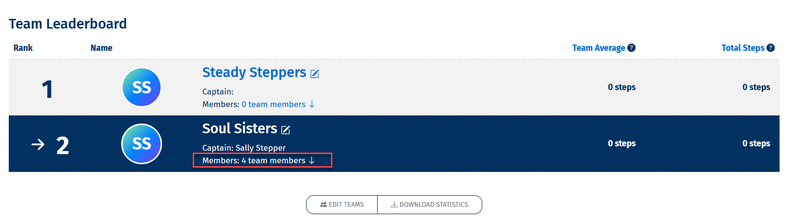
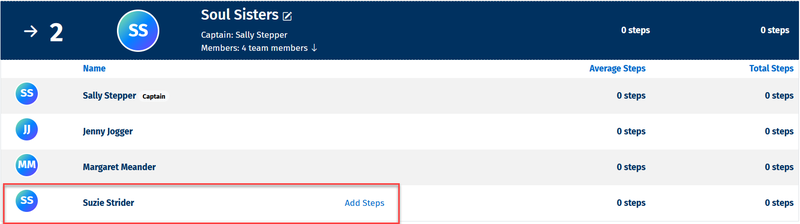
3. Select Add steps next to the Virtual Team Member
4. Enter the steps or activity for your Virtual Team Member and Save steps
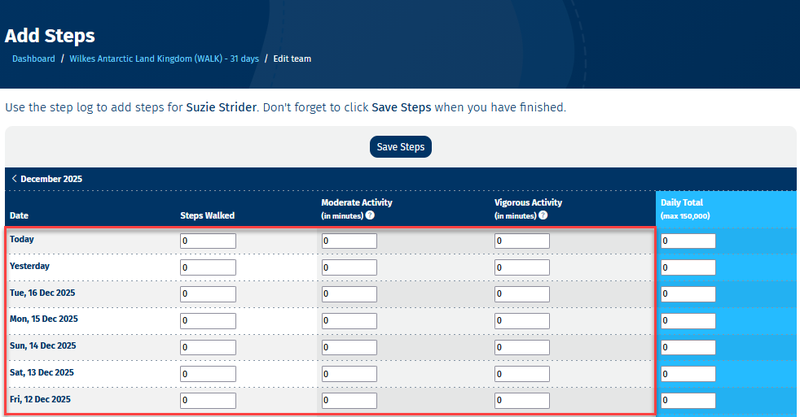
5. The entered steps will now be saved and contribute to your team total
6. Repeat this process regularly to keep the Virtual Team Member and team total steps up to date